

The Adaptive vibration It is a new function that has reached all mobile phones with Android operating system 15. What this type of vibration does is adjust the intensity according to the environment in which you are. To achieve this, smartphone microphones and sensors scan your environment to determine if the vibration must be less or greater depending on the conditions analyzed (such as street noise, bustle, total silence ...).
The objective of adaptive vibration is that you do not miss any notification, when the vibration engine is always adjusted to the place where you are. Thanks to this automatic phone adjustment, you will not overlook calls, messages, emails and more. In this article you will learn to correctly enable adaptive vibration in Android.
Steps to use adaptive vibration in Android
The only thing you need to activate adaptive vibration is that your mobile has Android 15 because it is only available from that version. Then, follow these steps to enable the function within the phone settings:
- Enter the "settings" of Android and press the "sound and vibration" option.
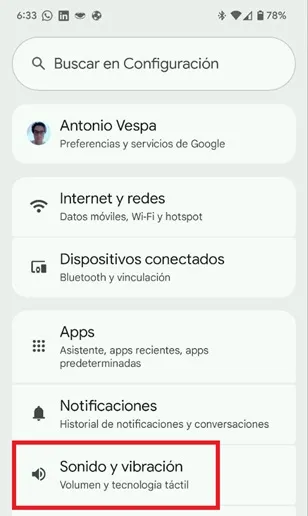
- A new window will open, move down and select «Vibration and tactile technology».

- Lower the cursor and touch "adaptable vibration."

- In the new section, activate the "Use the adaptable vibration" option.

That is all you should do to use adaptive vibration, with this it will be enough for the microphone and mobile sensors to be used to determine the sound levels and the context in which you are to establish the intensity of the vibration.
In this way, if you have the mobile in your pocket and you are in a silent place, the vibration will be mild, while if you find yourself in a very noise place the vibration will increase so you know that you are receiving notifications or important alerts on your phone.
Leave a Reply