

Pinterest is a great search engine for ideas, inspiration... where you can find all kinds of photographs and videos, but it has been filled with content generated by artificial intelligence in recent years.
The avalanche of this type of content is such that the platform, in response to the requests of many users, has launched the possibility of filtering the content generated by AI to leave it out of the search results and the photographs and videos that are displayed when accessing Pinterest.
If you do not want to be influenced by computer-generated content, you must activate this filter to leave everything created by AI out of Pinterest. In this article you will learn how you can do it.
Steps to prevent AI-generated photos and videos from being displayed on Pinterest
To delete AI-generated content from your Pinterest account, you must access the platform's configuration options from your computer or mobile phone, although they are not available to everyone in the Pinterest app, so it is better to go to the desktop version and do the following:
-Access your Pinterest account and from the home page, click on the gear icon located in the lower left corner of the screen.
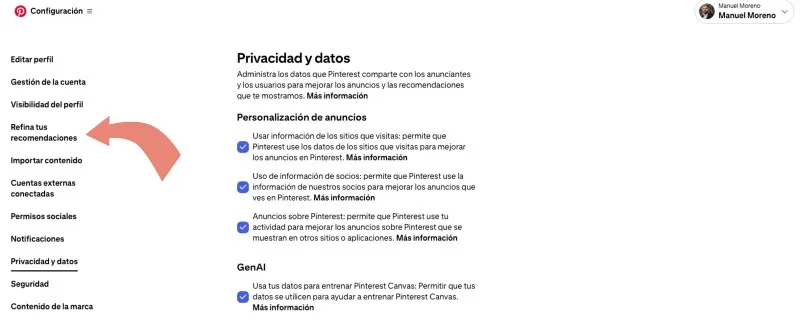
-In the menu that appears, click on "Refine your recommendations"
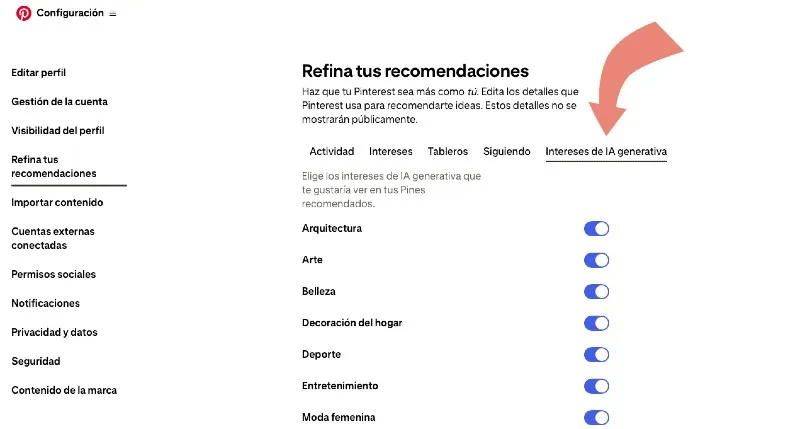
-Now click on “Generative AI Interests”
-Just disable the buttons for the topics for which you do not want AI-generated content to be shown when Pins are recommended to you.
The process is not automatic, and as Pinterest indicates in a warning message when you deactivate each button, this means that less AI-generated content will be shown gradually.
It is even possible that they will continue to show some AI-generated content over time, but in any case, there will be less than what would be shown if this function was not activated.
Leave a Reply