
Although Gemini AI has been developed by Google and is always associated with Android, the truth is that this artificial intelligence is not limited to this operating system. In fact, Gemini can be used on iOS without any problem, which will allow you to enjoy functions such as summarizing website content, transcribing WhatsApp audios and many more on your iPhone.
If you are a person who uses AI constantly and do not want to depend solely on Apple Intelligence, one of the best alternatives you have at your disposal is Google Gemini. In this article you will learn how to use Google AI correctly on your iPhone.
Tutorial to use Gemini on iOS
It is a quick, easy and safe procedure because you will find everything you need on your iPhone or iPad (since the steps are the same).
You will not depend on third-party apps nor will you have to make changes to the mobile operating system. Of course, you need to have an active Google account. The indications are the following:
– Enter the Google application on your iPhone, if you have not installed it, you can download it in the App Store. Once inside the Google app menu, log in to your Google account.
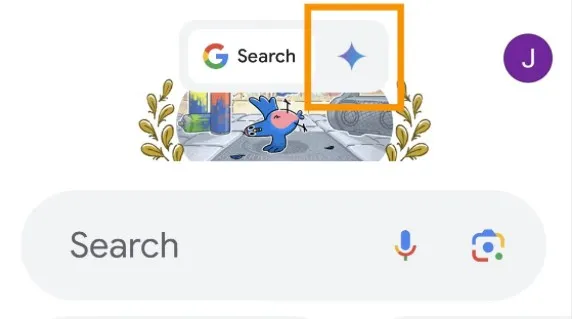
– When registering, the Google application will load and take you to its main menu. While there, press the Gemini icon located to the right side of the Google “G” (top of the screen). If the icon does not appear, your account does not have Gemini activated, perhaps because it is a company account.
– The Gemini terms and conditions of use will open, click on the “Use Gemini” option.
– That's all you have to do, by accepting the permissions, you will enter the Gemini interface. There you can chat with the AI, send it prompts and voice notes, and you can also give it access to the iPhone's camera to scan the environment in real time. This is useful for finding product information, translating content, giving context examples, and more.
Leave a Reply