

The social network X (formerly known as Twitter) has an option that allows Download all your profile data and create a backup copy.
This is very useful in different situations: in case you are going to delete the X (Twitter) account, change social networks... or simply for security and to avoid the loss of information such as tweets, direct messages, photos and followers.
If you are thinking about any of these options and you don't know how to protect and preserve your information in X, here is a step-by-step guide to achieve it.
Steps to download all your X profile data
Can download your X data from both the mobile version and from the web. Keep in mind that the device you select to download must contain enough space to store the file, which can be quite large. Know the steps for each team according to your preference:
From iOS or Android
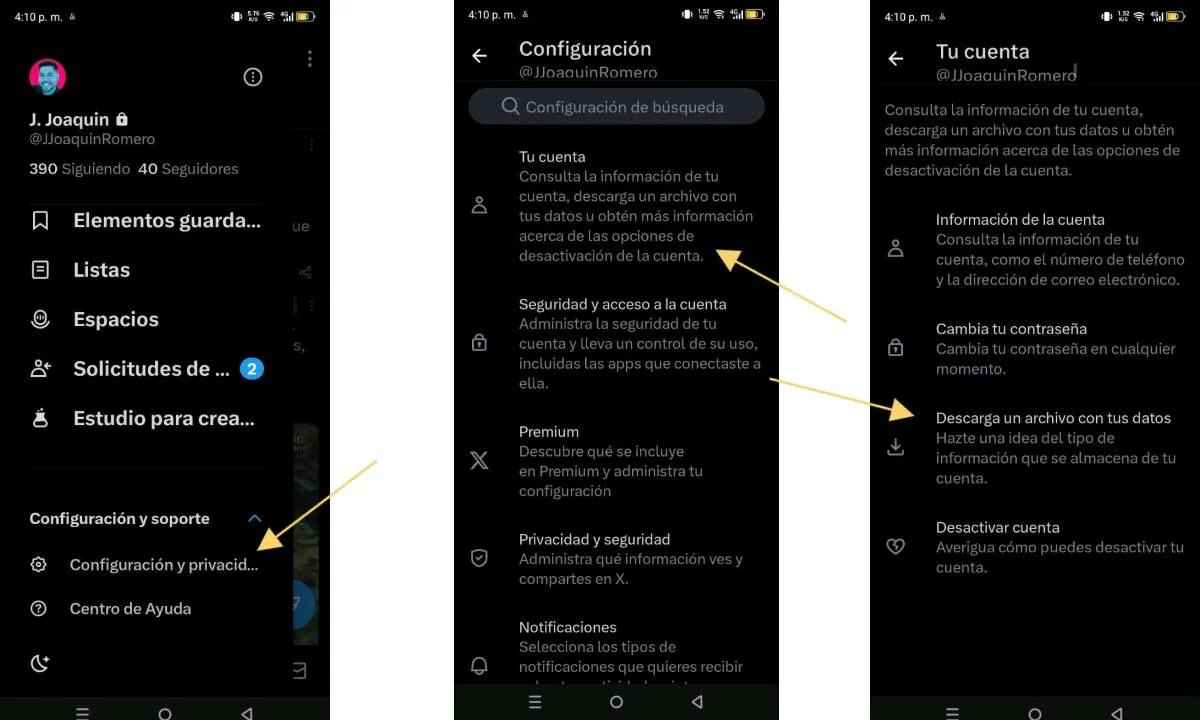
-Login to your Twitter account and enter the configuration options by tapping the profile photo located in the upper left corner of the screen.
-Display the “Settings and support” option and tap on “Settings and privacy”.
-Enter "Your account", then "Download a file with your data" and confirm the profile password to request the download of the file.
From the web version of Twitter

-Login to your Twitter account and in the left side menu touch the three dots to access more options.
-Press the “Settings and privacy” option then “Your account” and press “Download a file with your data”.
-It will ask you for the profile password to validate that it is you, enter it and select "Request your file."
After making the request to download your data from
Leave a Reply