
Now Instagram Notes allow you to add GIFs simply and quickly. Although this seems like a minor addition, the truth is that it will allow your message to stand out at the top of your Instagram followers' inbox.
Using this new feature, you'll have the simplicity of Notes enhanced by the visual dynamism of GIFs. Thus, instead of writing long sentences, GIFs will be useful to communicate emotions, moods and announcements in a more expressive way. This will save you time and effort, since you will not have the need to publish a Story or a post.
Next, you'll learn how you can add GIFs to all the Notes you create on Instagram so you don't go unnoticed.
Steps to add a GIF to Instagram notes
It is a simple and accessible process that you can manage from the same section of the inbox, you only have to do the following:
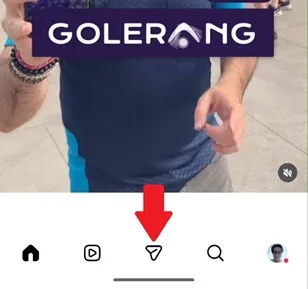
– Enter the Instagram application and tap the messages icon in the bottom menu (it is shaped like a paper airplane).
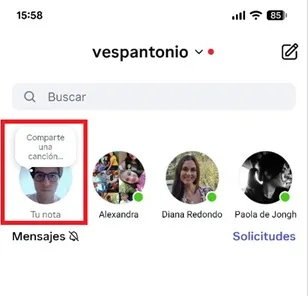
– You will enter the direct messages section, click on your profile photo called “Your note”.
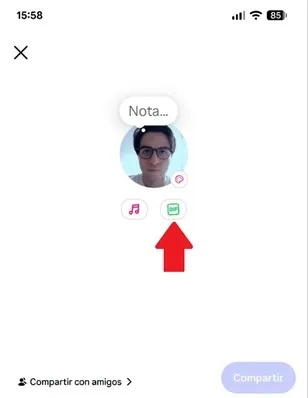
– You will see that under your profile photo there is the “GIF” option, click on it.
– Now, you can use one of the GIFs that Instagram offers by default to publish it with your Note. If you don't like any GIF, you can use the search bar to find a specific topic, such as pets, landscapes, hearts, sports, video games, etc.

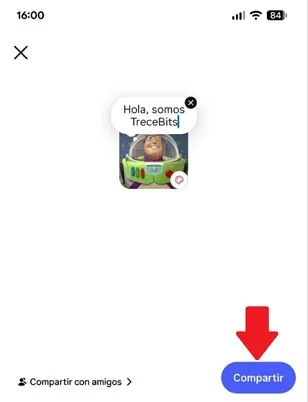
– Once the GIF has been chosen, write the Note and click on the “Share” button, which is located in the lower right corner. This is all you have to do, now the note will be published with the GIF you selected.
Leave a Reply