

Recover a hacked account on Instagram It is a challenge, since the cybercriminal could have changed all the original passwords and accesses that prevent you from accessing it. However, all is not lost; From Meta there are options to resume it following a series of steps and instructions, such as requesting a code with your email or verifying your identity with the platform. You can also try contacting Instagram.
Going through this situation is quite complex, since it requires an investment of time and effort, but if you can verify that it is indeed your Instagram account has been hackedit is possible to recover it. Below are all the instructions to follow to have your profile intact again.
Steps to recover your hacked Instagram account
There are several things you can do to recover your hacked Instagram account and, depending on the type of profile you have, some steps may or may not work. However, the recommendation is to try them all until you manage to log into your account. These are the indications:
Check your email
Enter the inbox of the email associated with your Instagram account. Check if you have received a message from this email “[email protected]” indicating a change to your current email. If you have it, but you had not requested it, enter the email. The same message gives you the option to reverse the procedure, preventing the email change from continuing.
If the message indicates that a change to personal data, such as your password, has occurred, you must request a login link or security code from Instagram.
Request login link
To request a login link on Instagram you must follow these steps:
-Go to the Instagram home screen and press the "Forgot password?" option.
-Enter your username, email or mobile number associated with the Instagram account and press the "Send login link" button.
If for some reason the cybercriminal has changed all this data and none of it corresponds, you must enter this website "https://www.instagram.com/hacked/" and follow the steps indicated by the platform.
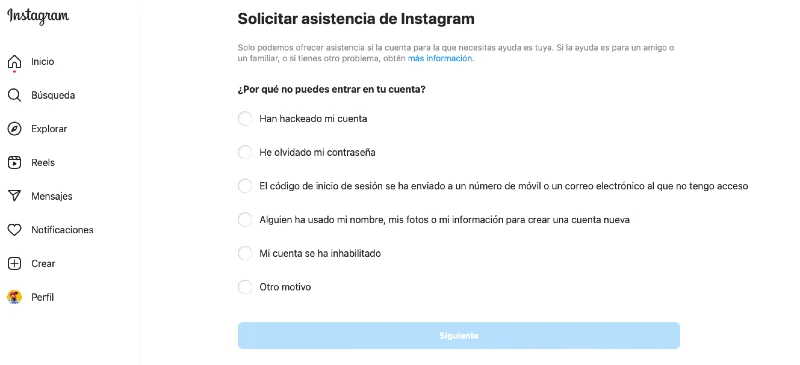
-Check your email or SMS messages to receive the link, enter it and follow the account recovery steps.
Request help and verification code from Instagram
In case the login link has not worked, you must ask Instagram for help by following these steps:
-Go to the Instagram home screen and press the "Forgot password?" option.
-Enter your username, email or mobile number associated with the Instagram account and check the option "Do you need more help?"
-Select the recovery method; It can be through your email or by sending a security code.
-Once the code is sent, use it to log into your account.
Verify your identity with Instagram
Instagram may ask you for verification data depending on your account type. For example, if it's personal and there are photos and videos of you, select the "Selfie Video Verification" option. The system will ask you to record a selfie video to verify your face and compare it with that of the posts.
If the account is commercial or business and there are no publications where your face appears, select the "Verify my identity" option. The system will ask you to enter data linked to your account, such as the email address or phone number with which you registered and the type of device you used to do so, for example, if it is iPhone, Android, iPad, among others.
Once verified, an email will be sent to you indicating that the account is indeed yours and it will be returned to you. Furthermore, it is indicated that the material will not be used in other processes and that it will be eliminated within 30 days after being processed. In case the video has not been validated, you have the opportunity to send another one that will be reviewed again.
When recovering your hacked Instagram account, the recommendation is to change the password for a more robust one. Also, turn on two-step verification and check your profile's login activity periodically to see which devices are connected to it.
Leave a Reply