
Gemini Omni is a new Google artificial intelligence model created to generate videos whose first version, Gemini Omni Flash, is now available.
It is not an AI dedicated to creating videos, but can create content in a detailed way using basic instructions. You won't have to use specific helpful prompts to get the result you want. It will be enough to enter a simple indication for Gemini Omni to proceed to generate videos through the combination of images, audios, video and text. Using its knowledge of the real world, with a simple reference, Omni will produce coherent and realistic videos.
On the other hand, Omni can also work on a scene through instructions that you send little by little, that is, they are chained to obtain a specific result. Thus, with AI you can edit a specific part of the video or restructure it completely.
Gemini Omni also allows you to convert photos to video and edit multiple interactions. You will be able to tweak each section that interests you, such as aesthetics, actions, environment, filming angle, style and more.
How Gemini Omni works
The first thing you should know is that Gemini Omni, so far, is only available to users who have a subscription to a Gemini plan. In addition, AI is already integrated into the Gemini app, the website and Flow. Taking this into account, its operation stands out for being easy and stable.
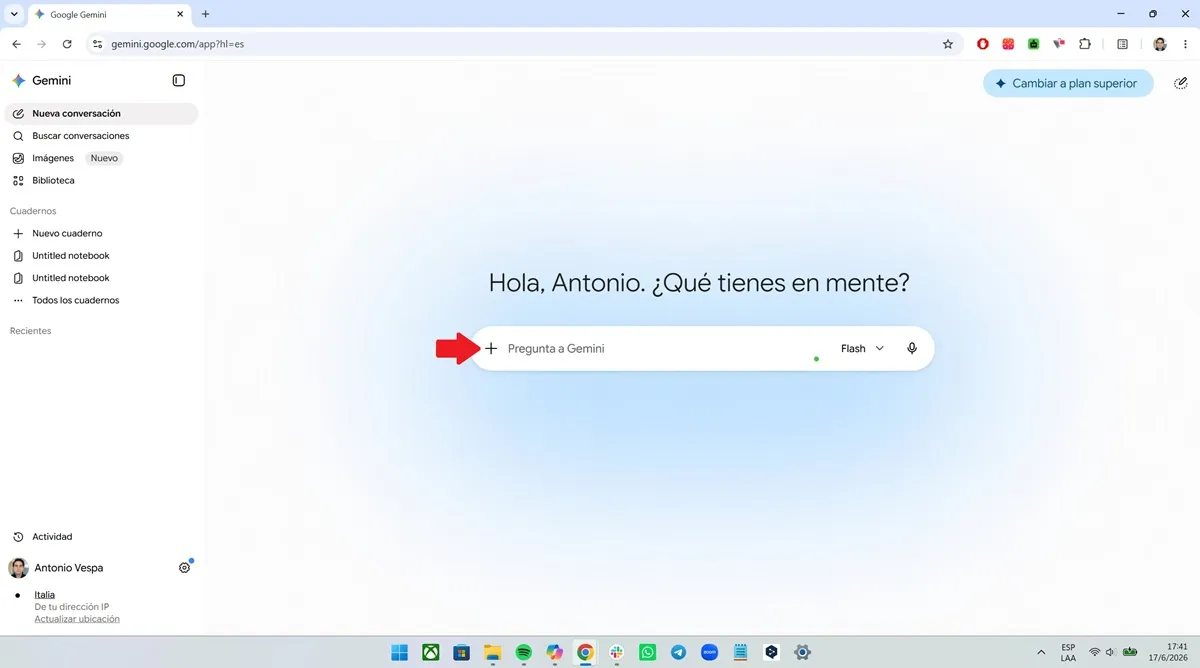
To use Omni, you must log into the Gemini platform and click on the "+" symbol to the left of the "Ask Gemini" box. A small menu will appear, there you must select "Create video."
Automatically, you will enter Gemini Omni. You will be redirected to a new section where you will see boxes that will suggest styles and ideas for the video. Right there you can also write a basic prompt to structure your video little by little by adding clips, images or audio.
Likewise, Omni allows you to attach a video and then explain what you want it to modify, be it the elements within the content, the actors, the lighting, or even use the video in question as a basis for another creation so as not to start from scratch again.
When you finish each of the instructions and obtain the desired result, Gemini Omini will proceed to create the video following the guidelines and elements that you have added. When the content has been generated, you can view, edit, share and download it to your tablet, mobile phone or computer.
Leave a Reply