
Telegram chats use a end to end encryption to make the conversation as safe as possible. The only people who can access the messages sent through Telegram are the receiver and the sender, without any intermediary. In fact, not even Telegram employees themselves can access these types of messages.
But in addition to applying this security encryption in conversations, something that WhatsApp and Telegram also do, you can create secret profiles in Telegram and even "secret chats" - like the iPhone's secret chats - that incorporate some extra functionalities.
How secret Telegram chats work
In this article you will learn everything about secret Telegram chats. These are the additional features they offer:
-Self-destruction of messages. You can select a certain time after which messages will be deleted automatically. It can be "One second", "One day", "One week" or "Off".
-Nothing in the cloud. You must take this feature into account, since you will only be able to access the messages from the device from which you sent them. If you change smartphones, the conversation will appear empty and you will have to start again.
-Screenshots cannot be taken. These chats prevent taking screenshots to maintain the privacy of the participants as secure as possible.
-There are no intermediaries. As mentioned at the beginning of this article, only the participants in that conversation can read messages in a private chat. Neither Telegram nor any organization can access them.
How to create a private chat on Telegram
The Telegram application offers everything you need to easily generate a private chat, so you will not depend on third-party platforms. It is a quick, easy and safe procedure, you only have to do the following:
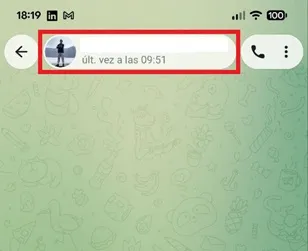
– Enter Telegram and enter the conversation you want to shield. Once there, tap the contact's name or profile photo at the top of the screen.
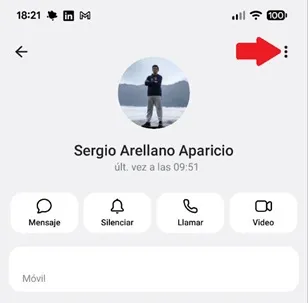
– The contact menu will open, now, press the three vertical dots in the upper right corner.
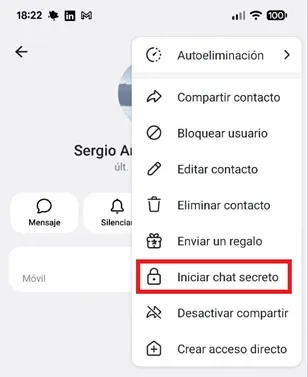
– You will see a small floating menu, there select the “Start secret chat” option.
– When you are in the chat, it will use end-to-end encryption, it will not leave any trace on the server, the messages you send will self-destruct and message forwarding will be disabled.
It is worth mentioning that, to activate the self-destruction of messages, you must press the contact's photo and, when in the menu, you will have to enable the box called "Self-destruction." This will be enough for the messages to disappear after the chosen period of time.
Leave a Reply