

Although mobile phones have a large number of melodies that can be set as alarms and there are apps to change notification tones on your mobile, the truth is that it is not at all easy to find those sound clips that have become a trend and that have gone viral thanks to TikTok.
Therefore, if you want to personalize your smartphone's clock, below, you will learn how you can make a TikTok musical extract become your alarm in a simple, easy and fast way, since you will not even need to download a third-party application on your phone.
Steps to set TikTok audio as an alarm
All you will need is to have the TikTok app updated to its latest version, a browser (like Google Chrome, for example) and, logically, a clock application that allows you to modify the alarm on your mobile. Once all the requirements have been met, perform the following procedure:
– Enter the TikTok app and press the magnifying glass icon in the upper right corner to search for the video that contains the music clip that will become your alarm.
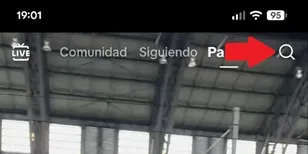
– Once you have found the video in question, tap the share icon in the lower right corner (arrow pointing to the right).

– A small menu will open at the bottom of the screen, select the “Copy link” option.
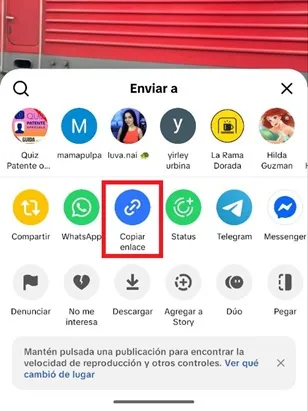
– Now, enter the browser of your choice, search and enter the Tiktokio website (https://tiktokio.com/). Paste the link you copied on TikTok into the blank box on the platform.

– Scroll down and press the “Download Mp3” button to download the sound to your phone.

– When the audio has downloaded, go to your smartphone clock and tap the “Sound” box.
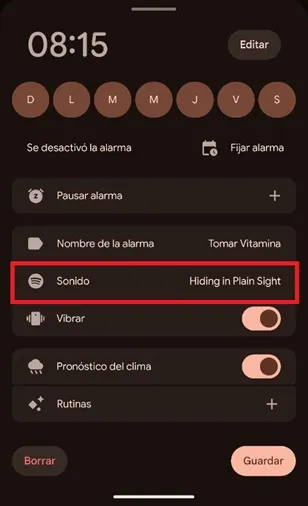
– Select the “Sounds” section and then choose “Add new”.
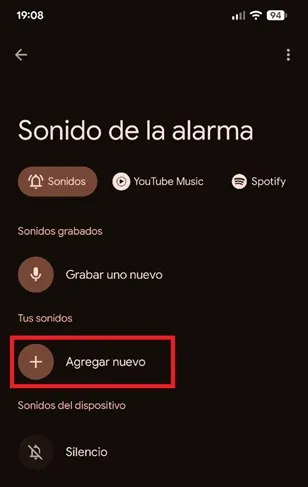
– The system will redirect you to Google Files (or the default file manager on your mobile), there press the three horizontal lines in the upper left corner and choose “Audio”.
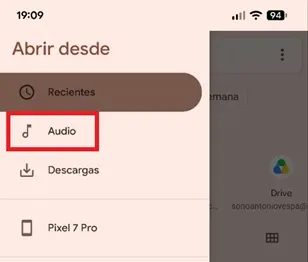
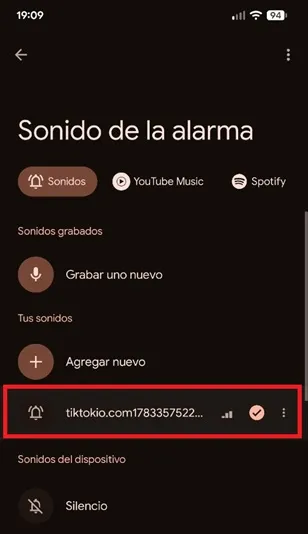
– Click on the TikTok audio to set it as an alarm.

– That's all you will have to do, now the clip you downloaded from TikTok will become the alarm on your phone.
Leave a Reply