

By default, the Android system records each of the notifications you receive in your mobile apps. Thanks to this, you will know which are the most active applications or those that distract you, since, if several apps send you alerts without control, you could take action on the matter to silence them and that do not become a discomfort.
If you are interested in knowing the number of notifications you receive in each application you have on the smartphone, in this article you will learn what you should do to access this information easily and quickly.
So you can know how many notifications you receive in each app
To know this information you will not need any third -party platform. Currently, Android mobiles have a section called “digital well -being”, which helps you control the time you spend in front of the phone so that it does not become an addiction.
Digital well -being offers various tools, such as a control panel that shows you the hours and minutes you pass in each app, an application timer, a rest and no distractions mode, allows to activate parental control and will also indicate the number of notifications that reach the applications. To have access to this last point, do the following:
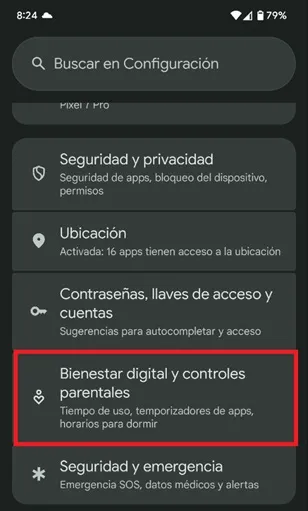
- Enter the "configuration" of your mobile, move down and select "digital well -being and parental controls."
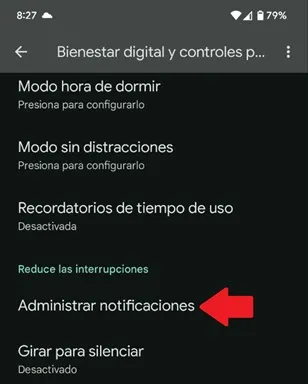
- A new menu will open, lower the cursor and choose "Manage notifications."
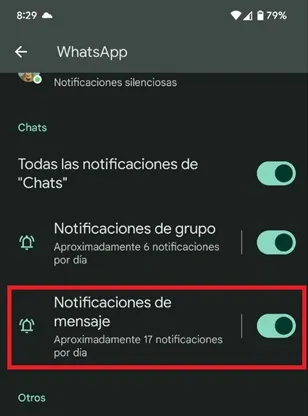
- Now, enter the app in which you want to know how many notifications you receive and in the "Message Notifications" section you will see the average alerts of that application.
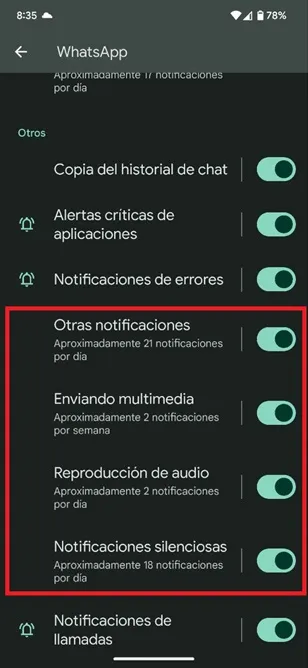
- Within that section and, depending on the app in question, you will also obtain information on the amount of notifications you receive in other areas, such as: group chats, voice notes, silent alerts, call notifications and errors and more.
Leave a Reply