

Advanced protection is a security protocol that can be activated on Android 16 so that the mobile has a greater defense against any threat, such as online attacks, corrupt apps, dangerous websites ... and will also identify spam and fraudulent calls, among other functions.
An advantage of the Advanced Android Protection 16 It is that, when activated, it does not interfere with the full operation of the smartphone. It is executed in the background to go unnoticed, at no time you will have to deal with slowdown, system freezing or unexpected reset caused by Android advanced protection.
What offers Advanced Android Protection 16
Although its main objective is to protect mobile information, this function stands out in various sections:
- Without interruptions: The mobile shelter is carried out in real time and does not interfere with the operation of the mobile because advanced protection is not invasive or consumes excess resources when scanning the terminal in search of threats.
- Simple activation: To use advanced protection, it will be enough to oppress a single button and Android will take care of the rest. The user should not do any type of management so that the tool works correctly.
- Telephone armor: Advanced protection prevents Malwares and malicious applications from deactivating Android security functions. Thanks to the system safety layers, the mobile will not be exposed and your personal data will be protected. In addition, it also prevents apps from manipulating Android permissions.
- Integration with applications: By enabling advanced protection, this will activate various safety configurations in multiple apps to be safer, such is the case of Google Chrome, Google messages, Google phone and more.
How to activate Android 16 Advanced Protection
If you want to have access to a basic set of improved security functions, you just have to follow these steps:
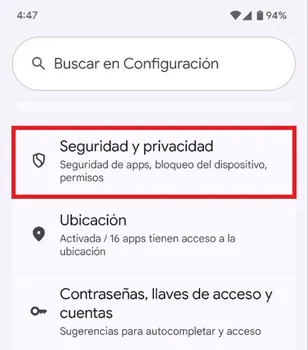
- Enter the "configuration" of the smartphone, move down and enter "security and privacy."
- A new menu will open, lower the cursor and select «Advanced protection».

- Finally, activate the “device protection” function switch to enable advanced protection to defend you against any threat that puts your data at risk.

Leave a Reply