

While Android notifications are useful to be aware of everything you receive on your mobile, such as messages, emails, apps of apps, etc. The truth is that, if an immense number of alerts to the terminal arrives without any control, this can become a nuisance, especially if you are working, studying or doing any other activity.
Android has a new function called «Notification sound reduction». When activating this tool, when you receive many notifications in a short time interval, the phone will lower the volume and minimize alerts for a maximum of two minutes.
However, calls, alarms and priority chats will not be affected by this addition. In this way, if you receive a torrent of notifications at any time and without prior notice, in this article you will learn to keep them under control easily.
Steps to enable notifications sound reduction
Before starting, it is important that you know that this tool is only available on Android 15. Taking this into account, the activation process in that version of Android is as follows:
- Enter the "configuration" of your mobile and select "notifications."
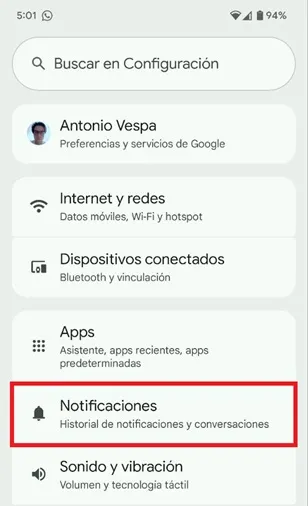
- Once inside the menu, move down until you find the "general" section and click on "notifications sound reduction."
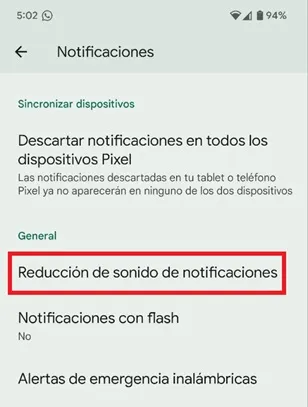
- Now, activate the option of the option «Use notifications sound reduction». This will be enough to use the tool correctly on your smartphone.
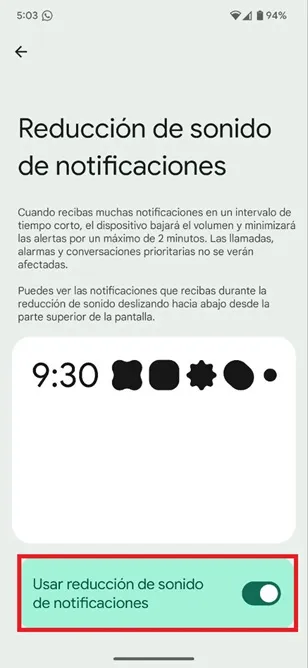
That is all you should do to control a storm of notifications in a certain period of time. It should be noted that to see the alerts you receive during the sound reduction you must slide down from the upper screen, there the system will expose each of the alerts that have reached the terminal.
Leave a Reply