
If you are going to move, travel for several months, check trends or simply want to use Instagram functions that are only available in some geographic areas, know how to change the country or region of Instagram It will be useful to you.
It is something that, like changing the country or Amazon region, will allow you to bypass annoying restrictions in your area. Now, by default, Instagram does not allow you to modify the positioning of the application with just the press of a button. Therefore, to understand how to make this modification, below, you will learn the steps you must follow so that the app recognizes your new location correctly.
Steps to modify the country or region of Instagram
There are various methods that you can apply to modify the geographic positioning of Instagram in a matter of a couple of minutes or less, the most effective are the following:
Modify the location of the mobile
This is the procedure par excellence, since it will allow you to completely change the country from which your phone operates. On Android you must follow these steps:
– Enter the “Settings” of the phone, scroll down and click on the “System” option.
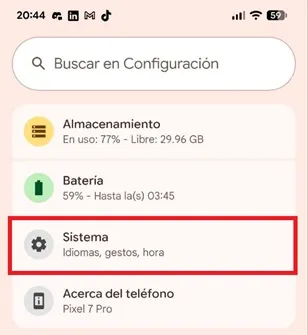
– A new menu will open, there select “Language and region”.

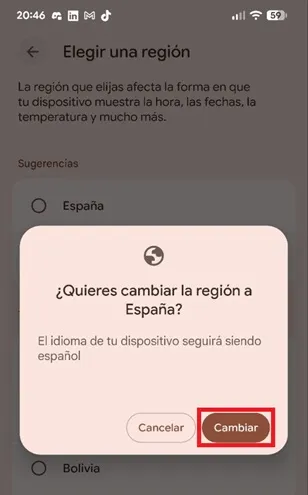
– Lower the cursor and enter the “Region” section. You will see a list of all available regions, choose the one you want to migrate to and press the “Change” button to apply the new region settings on your smartphone.
On iOS The step by step is similar to that of Android, follow these instructions:
– Enter the “Settings” of iOS and choose the “General” section.
– At this point, choose the “Language and region” section and enter “Region”.
– Finally, choose the region you want to belong to and apply the change.
Use a VPN
This is a reliable method because the VPN changes the IP address of your mobile, making Instagram believe that you are in the country you have selected in the VPN.
You can use one of the best free VPNs or opt for a paid VPN. You just have to enter the VPN app, connect to the server of the country you want to change to and browse Instagram for a few minutes until the platform detects the new location.
Change the app store area
By choosing another country in the Google Play Store or App Store, Instagram will also modify various sections, such as Reels, advertising and purchasing functions.
To do so, on Android, the procedure is as follows:
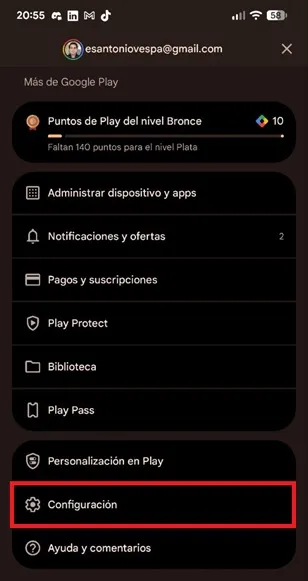
– Enter the Play Store and touch your profile icon located in the upper right corner.
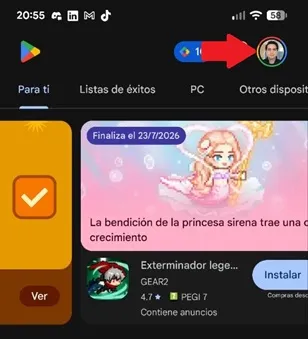
– The store menu will open, scroll down and enter “Settings”.
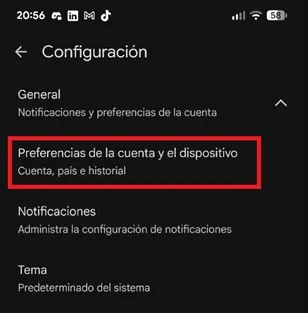
– Open the “General” section and select “Account and Device Preferences”.
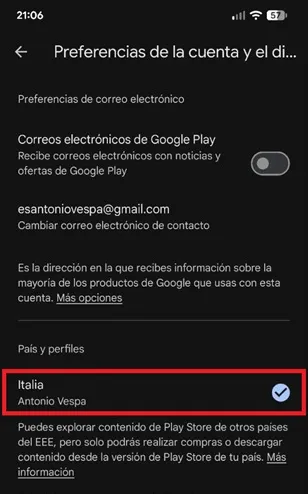
– Now, press on the country listed in the menu and change it to the desired region.
In App Store The steps to follow are:
– Go to “Settings” and choose the “Preferences” section.
– Enter “Country/Region” and choose the country you want to migrate to. Note that, for this procedure to be effective, you must register a valid payment method from the chosen country.
Leave a Reply