

If the messages you send through Instagram disappear after a while, this means that you have the function of temporary messages activated, which works equal to the messages that self -destruct whatsapp. It is a tool that makes your chats more private because what you write will be deleted automatically, preventing records from your conversations inside the platform.
Now, if you are not interested in destroying the chats you have in the application, the fact that they disappear will be annoying and unnecessary. Therefore, in this article you will learn to disable the option of temporary Instagram messages, which is not exposed to the naked eye.
Steps to prevent messages from disappearing on Instagram
In the event that you want to keep all your messages stored and it is not necessary to self -destroy after the recipient reads them, you must do the following:
- Enter the Instagram application and press the message icon located in the upper right angle.

- Enter the chat in which the messages are deleted and touches the name of the user that is located at the top of the screen.

- The contact menu will open, press on the "temporary messages" option.

- Now, several alternatives will be shown, select "deactivated" so that temporary messages are not enabled. However, if you are interested in using them, you can choose the period of time in which they will be deleted after they are read, either once visualized, after 24 hours or after seven days.
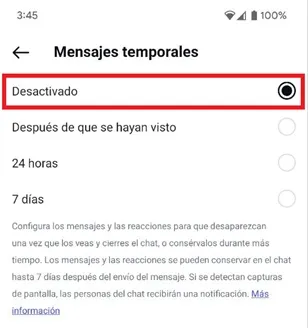
That is all you should do to prevent Instagram messages from disappearing. It is important to mention that you must perform the same procedure in each of the chats where the messages are deleted, since there is no global option that allows to deactivate temporal messages in all conversations.
Leave a Reply