

Having multiple accounts on Instagram and managing them in the same application is simple. Many people have several profiles, one with a personal objective and another for their SME or business, for their pet on Instagram or for a certain hobby.
Switching from one Instagram account to another is also very simple. You don't have to leave the application. Even to create the new account from scratch there is no need to leave the one you are using. To do this you only have to follow a few simple steps.
How to add a new account on Instagram
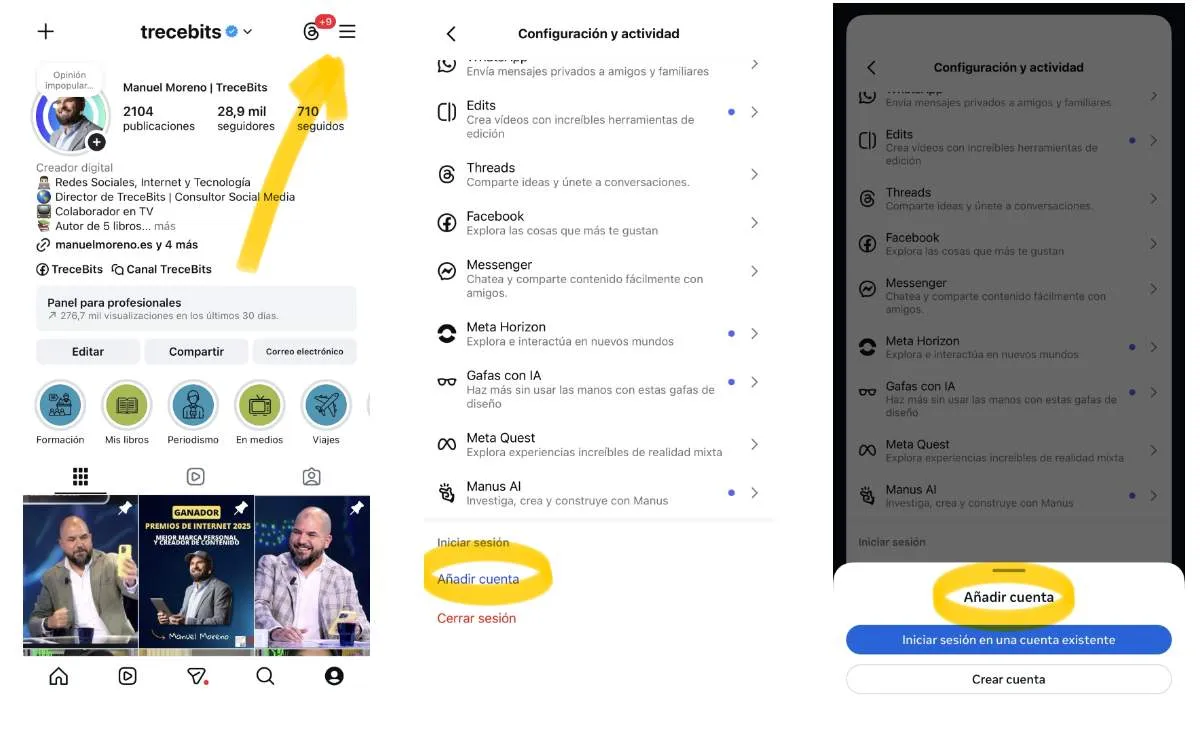
First of all, you must go to your Instagram profile. All you have to do is click on the icon in the lower right corner to access your profile.
Once this is done and you have accessed your profile, you should look at the top right, where you will find three horizontal lines. You must click on them so that a window with options appears.
The “Settings and Activity” menu will appear. There you have to scroll to the end. The last section you will see will be “Add account”.
Click on it and you can add an account that already exists from this new window. You can do this by entering the phone number, username or email and password. You can also start a new session from Facebook.
If you want to create a new account, you can do that too. You just have to click on "Register", located at the bottom. This way you can create an account from scratch without closing your main account.
To switch from one account to another you just have to go to your profile and hold down the name. If press and hold for a moment, A window will appear in which you can switch from one account to another without any problem.
Leave a Reply