

You probably didn't know, but there are two ways to restart an Android phone without having to press the power button. And Android phones have a series of tricks and shortcuts that allow you to speed up the smartphone use experience and that not many people know about, and these are two of them.
Thus, if the power button on your phone breaks or you have it configured to perform any other action - such as accessing Gemini -, thanks to these alternatives you will be able to restart your mobile normally.
In fact, it is advisable to do it periodically to, for example, free up the phone's RAM, resolve temporary errors, apply security patches that are only activated with a reboot, and more options.
In this article you will learn what you should do so that restarting your mobile does not become a problem if the power button does not work correctly.
To use either of these two functions you will not need to have any third-party app, since the Android operating system offers everything you need to restart the smartphone without depending on the physical button. You can do it from the Quick Settings menu or from the accessibility menu of your mobile.
– While on the main screen of your phone, fully display the quick settings panel. To achieve this, make the gesture of sliding your finger from top to bottom twice, this way the menu will completely open.
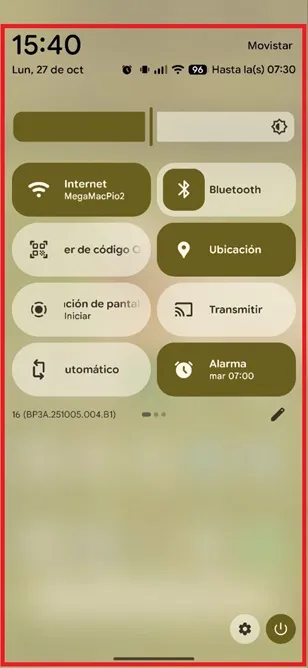
– Once you have the entire menu open, tap the power icon located in the lower right corner.

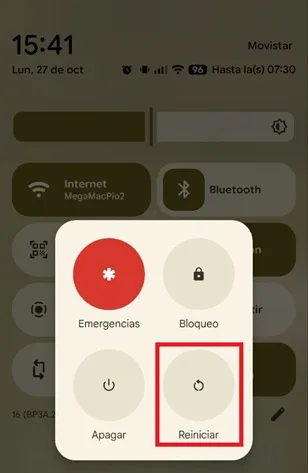
– The system will show you several options, to restart the terminal select “Restart”.
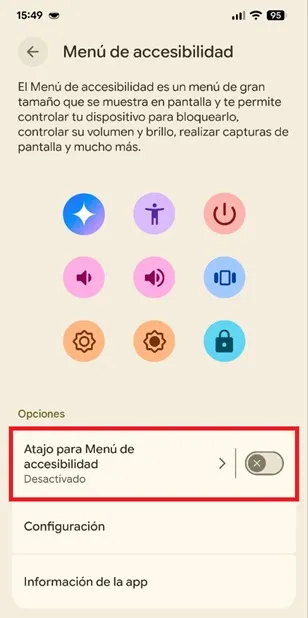
Another option is to activate the Accessibility Menu, you can do it as follows:
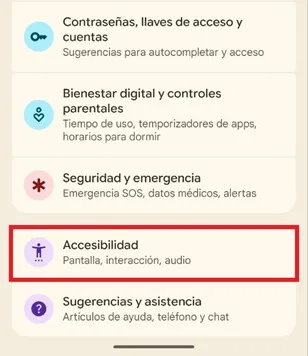
– Enter the “Settings” app on your phone, scroll down and enter “Accessibility”.
– Lower the cursor and enter the option called “Accessibility Menu”.
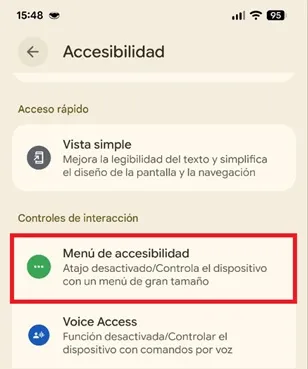
– Once there, activate the switch for the “Accessibility Menu Shortcut” function.
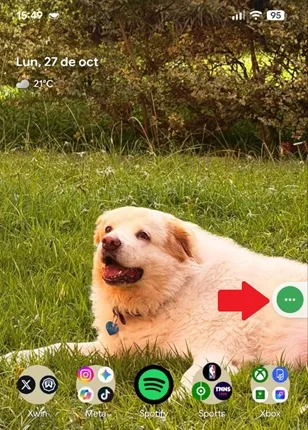
– Now, to restart the terminal, press the button at the edge of the screen.
– Choose the “On” option.

– Finally, click on “Restart”.

Leave a Reply