

It is more than possible that Facebook has ever asked you to share your contacts from your mobile phone book. The social network uses this information to make friendship suggestions for you in the "People You May Know" section and to establish what common contacts you have with other people, the similar tastes you share, etc.
If contact upload is activated, this information is updated automatically. Facebook automatically uploads contacts from your phone or tablet whenever you log into your platform account, checking which new contacts you have.
In this article you will learn how to deactivate -and activate- this function to share or not share your calendar data with the social network.
Steps to allow or prevent Facebook from accessing your mobile phonebook
If you no longer want to share your calendar information with Facebook, you can manage it as follows. You can do it from the Facebook app, both on Android phones and iPhone phones by following these steps:
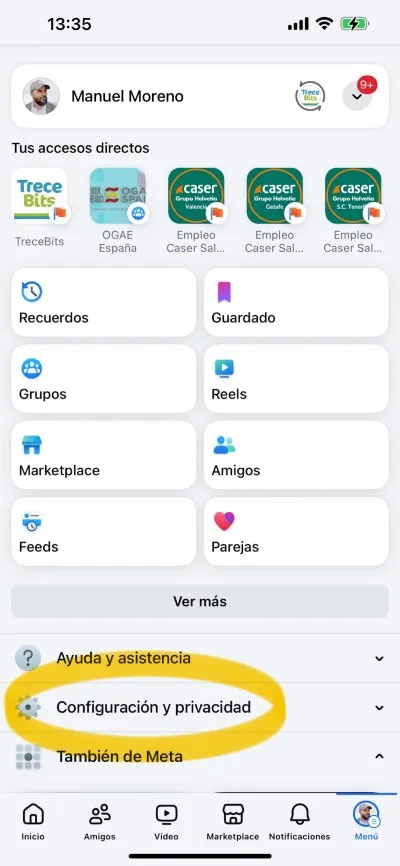
-Enter the Facebook app and press on the three horizontal lines found in the upper right corner of the screen on Android, to access the Options Menu.
If you use an iPhone, the three horizontal lines are at the bottom of the screen, but the procedure is the same.
-There, enter "Settings and privacy" and then click on the "Settings" section.
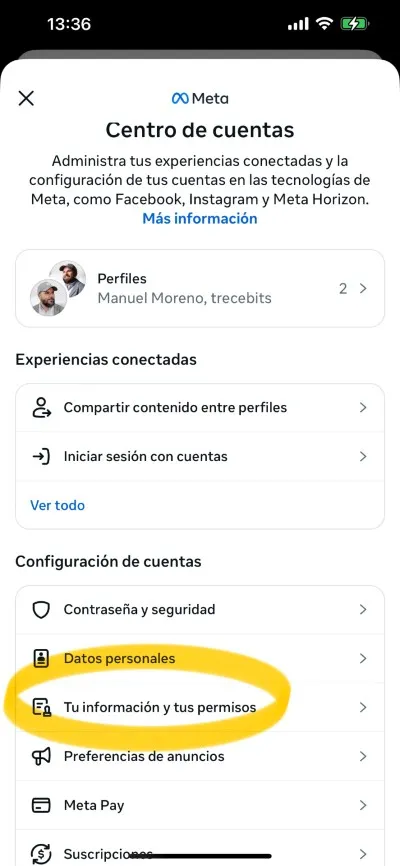
-Now go to “Account Center” and then click on “Your information and permissions”.
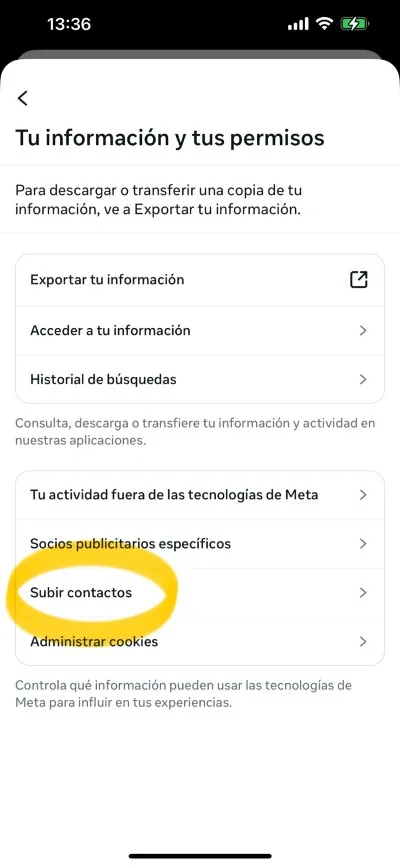
-Now click on "Upload contacts" and then select the Facebook account it refers to, of how many you have.
-There you will see that the option "Continuous contact upload" is there. You can press to activate or deactivate this setting.
You can also disable continuous contact uploading on Facebook from an iPad or from the Facebook Lite app.
Of course, keep in mind that when you deactivate the upload of contacts in the Facebook application, it is not automatically deactivated in the Messenger application. You will have to do it in it too.
Leave a Reply