

While having your Facebook account linked to Instagram allows you to have a company account on Instagram or facilitates publications programming, the truth is that this can be annoying because in some cases if, for example, you do not want information between both networks.
Whether for that reason, or whatever, if you want to separate your Instagram Facebook account so that they do not relate to each other and there is no possibility of even making cross publications between both platforms, in this article you will learn what you should do about it.
Steps to remove the Instagram Facebook account
The procedure for eliminating the Instagram Facebook profile is fast, easy and safe because the platform will offer you all the tools you need so that you do not depend on third -party app, so you will not compromise your personal data. In addition, the indications are the same in both Android and iOS, as if you did from the computer.
You just have to do the following:
- Enter the Instagram app and press the icon of your profile that is located in the lower right angle.
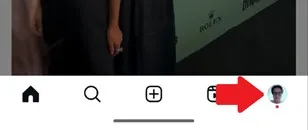
- Now, oppress the icon of the three horizontal lines that are in the upper right area.

- The options configuration of your Instagram account will open, select «Accounts Center».
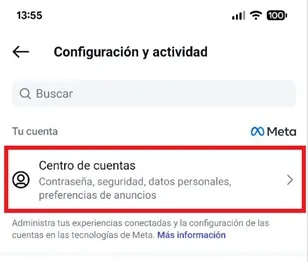
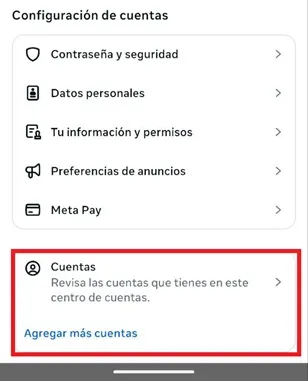
- You will be redirected to a new window, once there, move down and press on the "Accounts" option.
- You will see each of the accounts that are registered on Instagram, to disconnect the Facebook profile, it will be enough to press the "Remove" button.
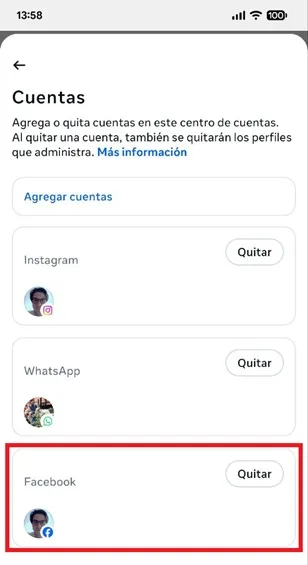
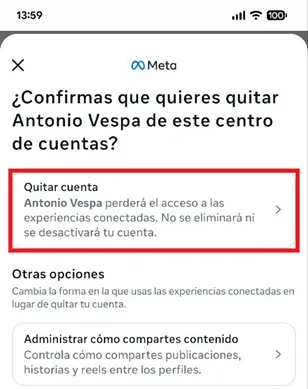
- Confirm the decision playing the option "Remove account."
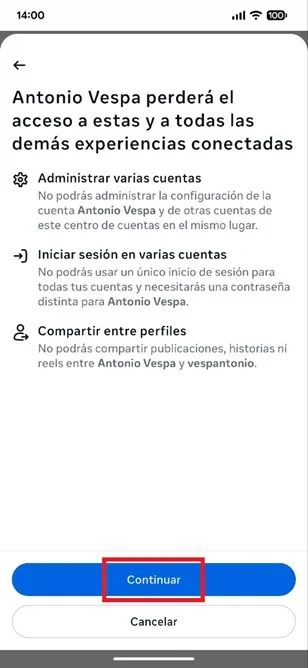
- Finally, squeeze the "Continue" button to eliminate your Instagram Facebook account definitively, with this it will be enough to completely delete the profile.
Leave a Reply