

He YouTube Incognito mode It is a function available in the Android and iOS app that allows you to use the video platform owned by Google without leaving any type of trace: your profile activity will not be recorded, your search history will not be saved, nor will the videos you have played be displayed. That is, with Incognito mode, the activity you carry out will not be linked to your Google account.
Of course, once Incognito mode is disabled, you will return to the usual conditions, and if you have YouTube Incognito mode activated and you do not perform any type of search within 90 minutes, YouTube will show you a warning message and Incognito mode will be automatically deactivated.
You should also keep in mind that with incognito mode activated you cannot perform public functions such as subscribing to a YouTube channel or writing comments. You will have to have it disabled to be able to do them.
Knowing this, if you want to use incognito mode to leave no trace of your browsing on YouTube, below, you will learn how to activate it correctly so that you can use it at any time.
Steps to use YouTube Incognito mode
In the YouTube app you have everything you need to enable Incognito mode in a matter of seconds. You just have to do the following:
– Enter the YouTube app and tap your profile icon (“You”) located in the lower right corner.

– A new menu will open, here you must press the “Accounts” button in the upper left corner.
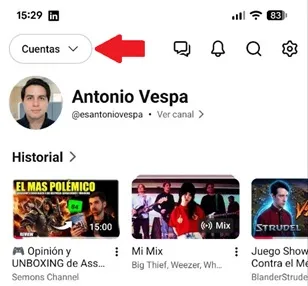
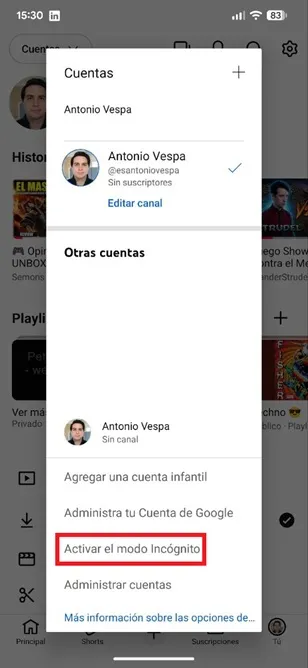
– A floating window will appear on the screen that will display your registered Google accounts, there you must select “Activate Incognito mode”.
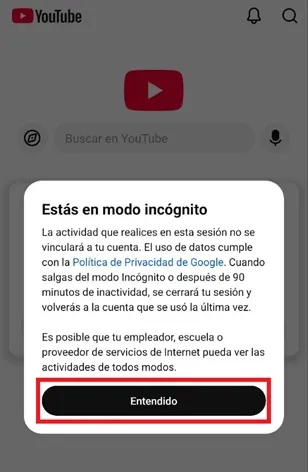
– YouTube will show you a message explaining how this mode works, press “Understood”.
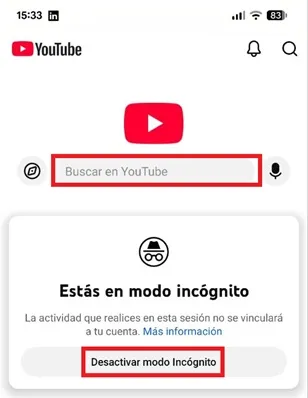
– That's all you have to do, now the app will tell you that you are in Incognito mode so that you can navigate the platform without leaving traces. When you want to leave anonymity, just press the “Deactivate Incognito Mode” button to return to normal.
Leave a Reply