
The latest update of Google Chrome (140.0.7339.124) includes a new AI based function that allows you to read the articles aloud and create a podcast. Thanks to this addition, the browser now has the ability to simulate two participants who will begin to discuss the issue of the article, which will allow you to receive the information dynamically.
Logically, it is a useful tool that will be of great help in the times when you cannot see the mobile, as when driving, for example. In addition, if you need to study and make you easier to learn through the audition, this option will come as a ring to the finger. In this article you will learn to use this function correctly.
Steps for Chrome to read the web pages
It should be noted that when creating the “podcast”, the AI will not only comment on the text, but will also give you a summary and highlight the main ideas of the article to ensure that you understand the information without any problem. The procedure you must perform is as follows:
- Enter the Google Chrome app, enters the web, opens the article you want to listen to and press the three vertical points that are located at the upper right angle.

- A floating window will open, select the option "Listen to this page."
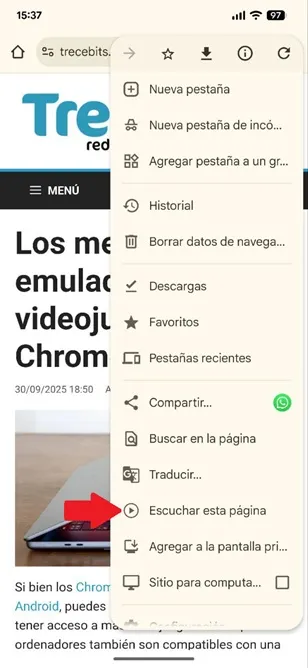
- Automatically, the browser will generate the podcast and start its reproduction.
That is all you should do, when using this tool you can do anything else while listening to the content or reproduces the podcast of the article that interests you.
If you are learning a new language, this addition will really be useful for practicing the pronunciation of words while the AI is dedicated to reading the content of the text, so you will have the support of intelligence to know what is the correct pronunciation of each term.
Leave a Reply