

When publishing a carousel of images in the same Instagram post, until now you could only publish a description text for all of them.
However, the application now allows you to add separate descriptions for each of the photos that make up the carousel. This is useful for structuring and presenting your content however you want, since the caption text will change based on what you've typed each time the person viewing your post swipes.
Below, you will learn how you can perform this procedure.
Steps to add different descriptions in a photo carousel
This is a simple, safe and quick tutorial that is available within the Instagram options, you just have to do the following:
– The first step is to enter Instagram and press your profile icon, which is located in the lower right corner.

– You will enter your content library, there you must press the “+” icon in the upper left corner.

– A floating menu will open, select “Publishing”.

– Now, to create a carousel, choose more than three photos or videos in the gallery that Instagram will display and press “Next” (upper right corner).
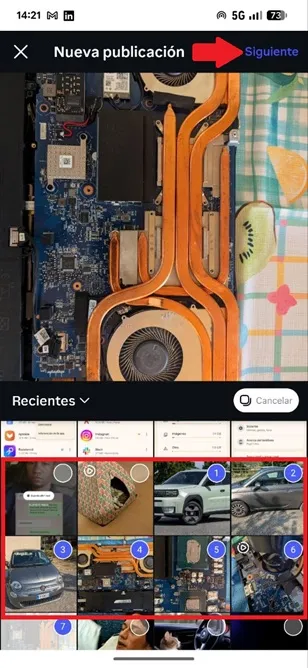
– In the next section you can edit the photos or videos to make them look more attractive. The app will allow you to add audio, text, apply an overlay, add filters, change the aspect ratio, and more.

– Now, to write a description for each photo in the carousel, press the option called “Add a photo or video caption.”

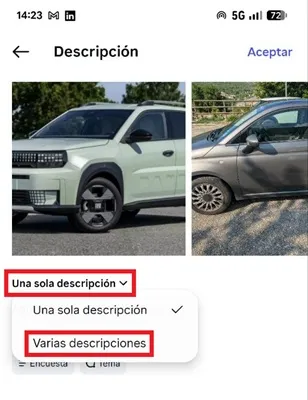
– Finally, tap the “Single description” box and choose “Multiple descriptions.” This will be enough for each image or video found in the carousel to have its own description, which is useful to explain each part separately; So what you show your followers will tell the story you want in detail.
Leave a Reply