

Tiktok has added a new function that allows you to use the automatic rotation of the screen when you watch videos. Thanks to this, when a video is recorded with the mobile positioned horizontally, you can see full screen content due to the integration of the new tool. This will improve the reception of long and explanatory videos (such as tutorials) because you will have a better visualization.
Now, despite how useful the new function is, the truth is that it is not exposed to the naked eye, to enable it you must navigate within the Tiktok configuration. Therefore, in this article you will learn what you should do to activate this tool when you want.
Steps to enable automatic rotation in Tiktok
Logically, the automatic rotation section is available within the Tiktok settings, to use this function you must do the following:
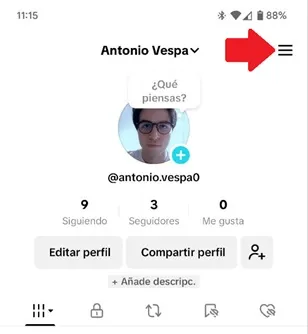
- Enter the Tiktok app and go to your "profile." There, press the three horizontal lines that are in the upper right corner.
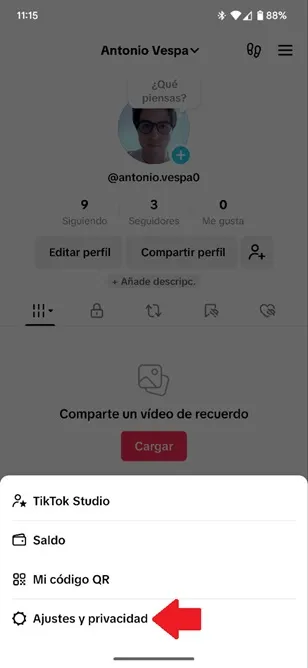
- A floating window will open in the lower area of the screen, there select "Settings and privacy."
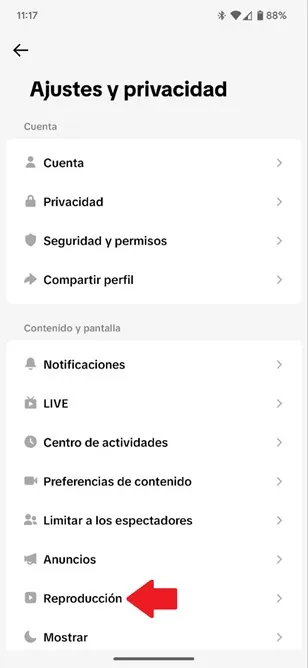
- In the new menu, choose the option «Reproduction».
- Finally, in the new section activates the "Automatic Rotation" option.
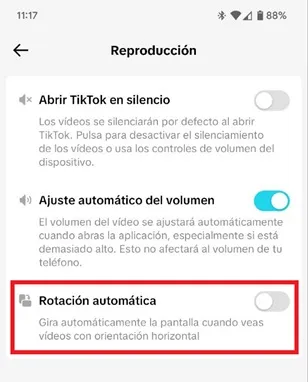
That is all you should do, when the Tiktok app detects a horizontal video, the system will turn the screen automatically. However, remember to activate the automatic rotation of your mobile screen so that the new Tiktok tool works properly.
If you disable the automatic rotation of your phone, Tiktok will not turn the screen when playing a video in aid format. In addition, do not forget that this function is gradually arriving at all Tiktok users, if you still do not have it available, update the app to its latest version and, if it is not yet enabled, you must wait a few more days to receive it.
Leave a Reply