
TikTok has launched a new feature called "News Board" designed so that content creators and account owners on TikTok have a quick and direct communication channel with their followers.
In reality, the "news boards" on TikTok are nothing more than another way of calling the channels, those that you already use for sure on other social networks. For example, there are broadcast channels on Instagram, broadcast channels on WhatsApp and also on Facebook.
Users must subscribe to your broadcast channel - or "news board" on TikTok - and will be able to receive exclusive content and messages sent directly by the channel owner.
In this article you will learn how to create your "news board" on TikTok and what type of content you can share on it.
How to create your broadcast channel on TikTok
At first, TikTok only allowed prominent creators to create “newsboards” to whom it had sent an invitation. However, now the functionality is available to everyone, so if you want to create your broadcast channel on TikTok, do the following:
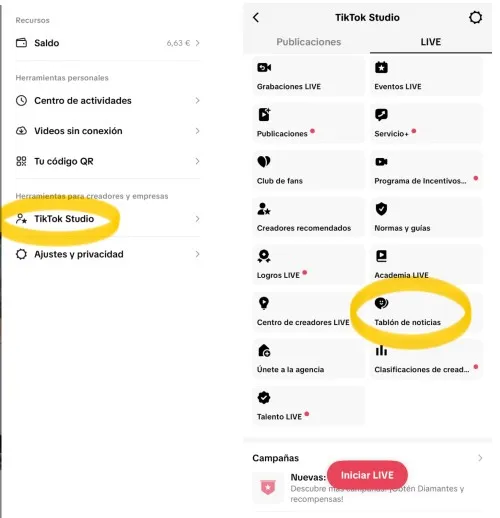
-Open the TikTok app and go to your profile. There, under the bio, you will find a link to go to TikTok Studio. If it doesn't appear, you can also get to TikTok Studio by downloading the independent TikTok Studio app or by clicking on the icon with three horizontal lines at the top right of the screen. There, in the menu that appears, click on "TikTok Studio".
-There now go to the "Live" section in the top menu
-Go down to the bottom by scrolling and you will find the "News Board" section
-By pressing it, you can create your news board. You can name it whatever you want, invite your contacts to join and make your first publications.
What content can you share on the TikTok "News Board"
On your news board you can share exclusive content with your followers, different from what you already publish on your profile. This way you will create a kind of "exclusive club" in which you will give priority to the people who follow your channel.
In the "news board" you can post photos and texts, but you can also create polls, share posts already made on your profile, broadcast a LIVE event on TikTok or take a photo or video directly on it by opening the camera.
People who follow your “newsboard” cannot post to it, but they can react to your posts with an emoji.
Leave a Reply