

Android autocorrect is integrated into keyboards such as Gboard or in the keyboard that the mobile manufacturer has chosen to install. This feature is useful for writing quick messages, receiving suggestions to apply in real time, and automatically correcting errors without having to go back over the body of the message.
However, if you want to write completely freely, autocorrect can become a nuisance when it makes automated edits or when it suggests multiple corrections, as this will interrupt your writing rhythm.
Therefore, if you want to write without interference and adapt your experience to your real needs, below, you will learn how to deactivate autocorrect.
Steps to deactivate autocorrect on your Android mobile
Disabling Android keyboard autocorrection is a safe and quick procedure, since the operating system itself allows you to make this modification. You will only have to do the following:
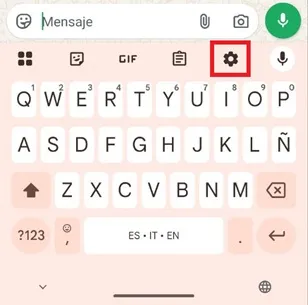
– Enter an application where you can display the mobile keyboard (like WhatsApp, for example) and then press the gear-shaped icon located in the top menu.
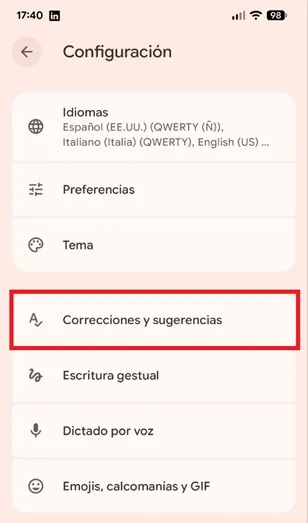
– Now you are in the keyboard menu, there select the “Corrections and suggestions” option.
– To disable autocorrect, simply deactivate the “Automatic Correction” function switch. If you want more freedom, you can also disable “Auto Caps”, “Spell Check”, and “Grammar Check”.
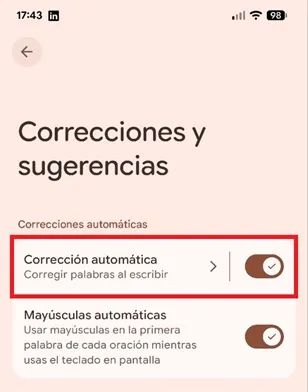
That's all you have to do, now when you type, the words will stay exactly as you typed them. Although you will have to be attentive to errors to correct them manually, not having autocorrect will allow you to use local slang without problems, as well as write abbreviations, use nicknames, among others.
If suggestions continue to appear, don't worry, since they will only be at hand in case you need them, but the keyboard will not make any changes on its own.
Leave a Reply