

Tiktok has a new function called "similar searches" that is activated by pausing the video you are visualizing.
At that time, and through the use of artificial intelligence, Tiktok analyzes the image and shows a small button with the phrase "Search for similar". By pressing it, the social network offers content related to the content, or labels that you can explore or even products.
It can be something useful to enjoy videos that are related to each other, which is practical to delve into a specific topic, but also somewhat annoying.
If you prefer a cleaner interface and do not want the app to invade buttons when pauses a video, you should know that you can disable similar searches easily within the Tiktok options and in this article we will explain what you should do.
Thus you can stop the "similar searches" of Tiktok
To disable the function, Tiktok offers everything you need in its application, so you will not depend on a third -party app. You just have to do the following:
- Enter the Tiktok app and press the profile icon located at the lower right angle of the screen.

- A new window will open, you must touch the three horizontal lines that are in the upper right corner to enter the Tiktok menu.
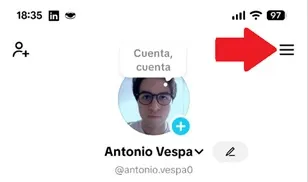
- Now, you will see that a small menu will be deployed in the lower area of the screen, choose the option named "Settings and privacy."
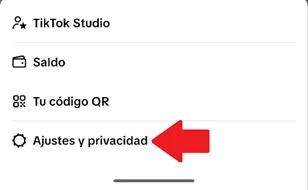
- You will see various sections, move down and get into "reproduction."
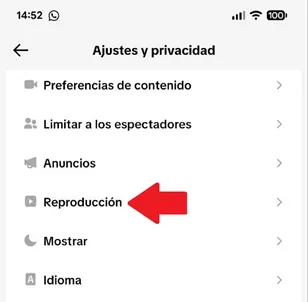
- Finally, deactivate the “Visualize object label» function switch so that Tiktok does not show the “similar searches” button when pauses a video.
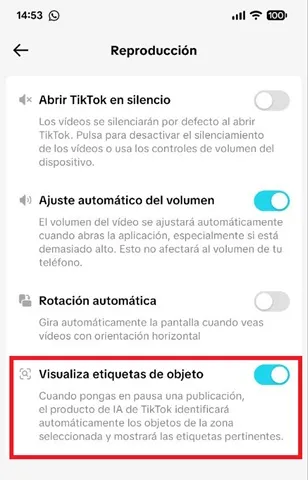
That is all you should do so that the "similar searches" tool disappear. Highlight that, for the changes to take effect, you must close the Tiktok app and reopen it so that the platform is restarted. This will suffice so that the modifications are applied correctly in the system.
Leave a Reply