

If your phone is experiencing slowdowns, system freezes, or is simply not as fast as before, cleaning the RAM will help improve its speed and performance. This will free up space to do more demanding tasks and close pinned background processes.
Thus, if you want to optimize the performance of your phone, one of the best options available to you is to empty the RAM memory. In this article you will learn how to perform this procedure correctly so that you do not depend on third-party applications.
Methods to clean RAM memory on your smartphone
On Android and iOS you can clean the terminal's RAM without any problem, although, logically, the steps vary depending on the operating system. In addition, you have nothing to worry about because you will not compromise the integrity of the mobile. You will need to do the following depending on what type of phone you have:
Android
– The first step is to activate “Developer Mode”.
– Once this mode is enabled, enter the phone's "Settings" and select "System."
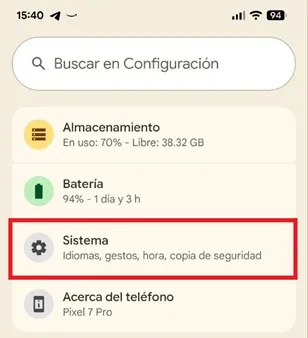
– Scroll down and click on the “Developer Options” option.

– A menu will open, tap “Memory”.

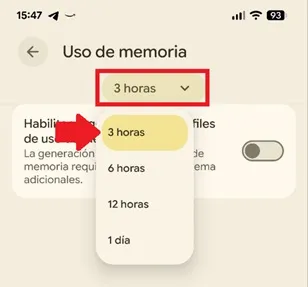
– You will enter the “Memory usage” section, display the hours box and choose “3 hours”. This will be enough for the operating system to manage and free the RAM every 3 hours, which will prevent a huge number of apps and processes from being stored in the background.
iOS
On iOS it will be enough to restart the mobile, but you also have another method at your disposal:

– Go to “Settings” on your iPhone and select “Accessibility”.
– Choose “Side Button”, enter the “Activate Confirmation with AssistiveTouch” option and activate it.
– Now, press and hold the side button until the power off slider appears.
Instead of turning off your smartphone, press the virtual "AssistiveTouch" button and hold the virtual home button until the screen flashes. The operating system will clean the RAM and return you to the main screen.
Leave a Reply