
Although at first glance knowing what version of Bluetooth your phone runs may seem unnecessary, the truth is that this information can be very useful.
For example, it allows you to know the smartphone's Bluetooth transfer speed, as well as the stability of the connection and its compatibility with current devices, such as wireless headphones, game console controllers, smart watches...
Currently there are these types of Bluetooth versions:
-Bluetooth 4.2: It allows you to enjoy a pairing range of 10 meters, a maximum data transfer speed of 1 Mbps and compatibility with a large number of devices. However, you won't be able to take advantage of modern audio formats, like LE Audio, for example.
-Bluetooth 5.0 or 5.1: You will be able to connect to two or more devices at the same time, the signal will be more stable and will have a range of 40 meters with a transfer speed of 2 Mbps.
-Bluetooth 5.2: You will get support for LE Audio (better quality with lower consumption) and Bluetooth 5.3 will give you access to broadcast audio, a function that will help you share music on several headphones at the same time.
If you want how to know which one your mobile phone runs, keep reading this article.
This way you can know the version of Bluetooth that your mobile uses
The procedure you use will depend on the operating system of your mobile because each platform has its own options.
Android
The easiest and safest method is to use the AIDA64 application, which is available on the Google Play Store and is approved by Google Play Protect. This means that it is a stable app and free of any threats. Do the following:
– Go to Google Play Store, search for the AIDA64 app, download it and install it.
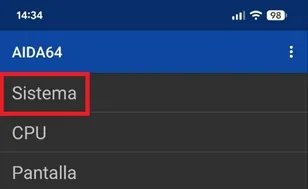
– Enter AIDA64 and press the first option called “System”.
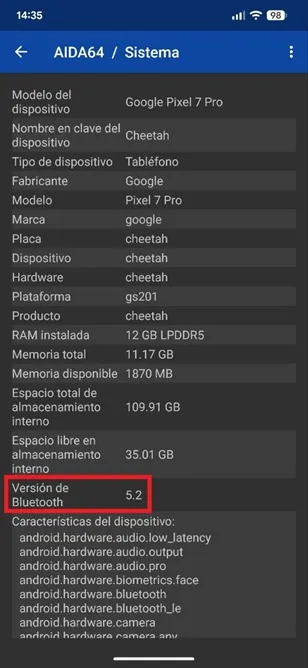
– Once inside “System” in the “Bluetooth Version” section you will see the support offered by your smartphone.
iOS
The most efficient way to know what version of Bluetooth your iPhone has is to look for its technical data sheet on the Apple website. So, for example, it will be enough to perform the following search in the browser: “iPhone 16 specifications”. In the first results, the browser will return the Apple page. You can also search for it at Apple Support (https://support.apple.com/en-us/docs/iphone).
Now, if you do not want to depend on the Apple website, you have other portals at your disposal where you will find all the specifications of any iPhone.
Leave a Reply