

The mythical EMULE platform continues in force for those users who seek the exchange of P2P files directly and safely. However, finding reliable servers has become an increasingly complicated task due to the proliferation of false or inactive servers.
If you are still an active user or want to start using it, here you will get a list of the best Emule servers. All of them offer safe connections and guaranteed operation.
The 5 best emule servers
The following server list is totally reliable and are completely operational:
Emule Security / IP: 80.208.228.241 / Port: 8369
Grupots Server / IP: 46.105.126.71 / Port: 4661
!! Sharing-Delvils No.1 !! / IP: 91.208.184.143 / Port: 4232
!! Sharing-Delvils No.2 !! / IP: 94.23.97.30 / Port: 4245
The Nostra / IP thing: 94.23.97.30 / Port: 4242
These servers stand out for being reliable and for offering stable connections, allowing users to download safely.
How to update trust servers
To guarantee a safe and stable connection, it is advisable to periodically update the server list. The process is simple and just requires following some basic steps:
-Primero, it is essential to have the most recent version of Emule installed on the computer. Once the program is installed, you must access Preferences and then select the option Server located in the lateral menu.
-In the server section, you must activate two options: Self-actualize servers list at the beginning and Assign high priority to hand -added servers.
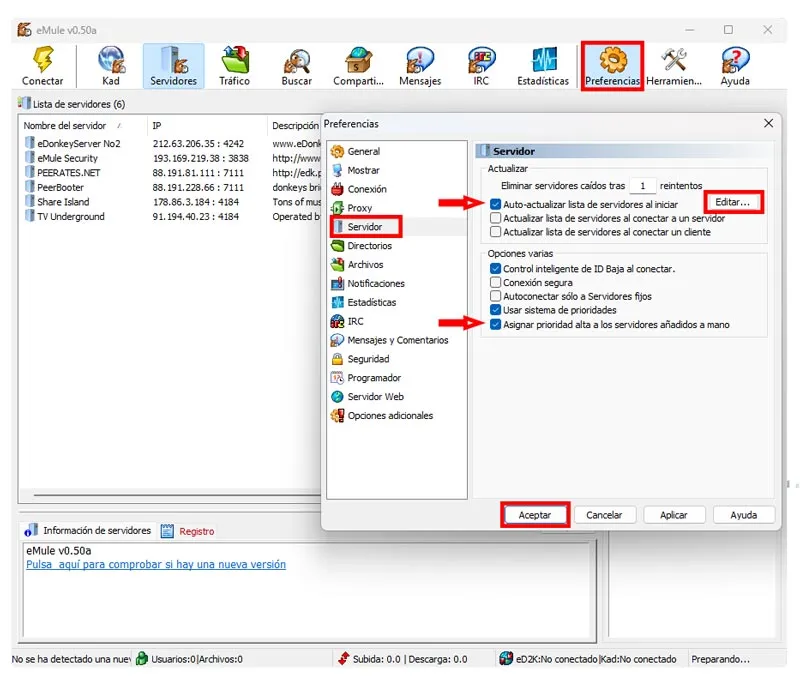
-After activate the aforementioned options, you must click on the button Edit and the notes will open. There you must insert the following link:
http://sites.google.com/site/ircemulespanish/descargas-2/server.met
-Now keep the file with the name addresses.dat. Subsequently, click on the button Accept To save the changes and restart emule so that the changes have effect.
In this way, make Emule to update the list of servers from time to time.
How to configure individual servers
In addition to updating the Emule servers list, you can also add servers manually. If you have a list of servers that you want to add yourself, you can follow the following steps:
-Abre emulate and access the tab Servers
-In the right part of the program you will see the section of «New server»there you must enter the corresponding data in the name, IP address and port.

-After entering the data, click on the button "Add to the list".
These steps will help you selectively add only those servers that you consider safe and efficient.
How to delete fake servers
The presence of false servers in Emule represents a risk for users. If you want to eliminate them manually, you must do it as follows:
-Accede to the window of Preferences and click on the section of Server

-Active options for Intelligent ID Control, Safe connection and Use priority system. It is recommended that you disable the rest of the options.
-Now click Apply and then in Accept To save the changes.
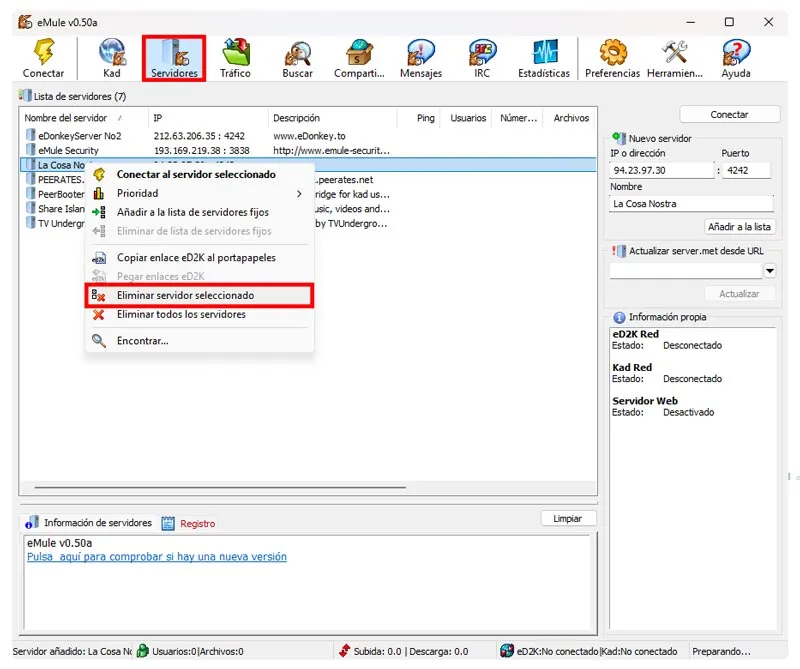
-Finally, on the tab of Serversyou just have to select the suspicious servers and eliminate them by right clicking on each of them.
With these simple steps, you can keep your emulate updated and free of threats, optimally taking advantage of your file exchange capabilities.
Leave a Reply