

He Android emergency button It works as a means of direct communication with emergency services and contacts. It will be enough to press the button so that the mobile automatically calls the entity in question to report any situation that has been presented, such as robberies, traffic accidents, health problems and more.
The ideal would never have to use such a button, but the truth is that it is extremely useful to any accident or unforeseen that compromises your physical integrity. Therefore, in this article you will learn everything you need to configure an emergency button correctly.
Steps to create an emergency button on Android
When using the emergency button, this will send your location through a preconfigured relief message. To have this function, you must do the following:
- Enter the "configuration" section of your mobile, move down and select "Security and emergency." If you do not find this option due to the customization layer of your smartphone, enter "passwords and security."

- A new menu will open, press on «Emergency SOS».

- Now, lower the cursor and activate the switches of the functions "call emergency services" and "share information with emergency contacts." This will help you call the relief service and, at the same time, send your exact location to your emergency contacts to help you.
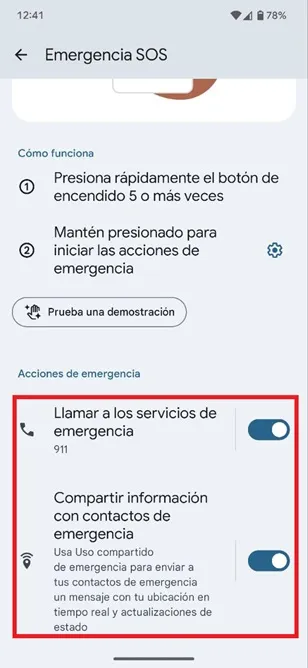
- That is all you should do, to use the emergency button you must quickly press the mobile ignition button five times or more to call the assistance body and send a message of help to your emergency contacts.
Now you have at your disposal an emergency button that you can use in any situation that compromises your well -being, so you will receive help from the authorities and your family and friends.
Leave a Reply