

Microsoft Authenticator, one of the most popular applications for managing passwords and single -use keys, similar to Google Authenticator, has decided to redirect its course. The app of offering storage and self -supported password functions, and will focus exclusively on the generation and administration of single -use temporary passwords.
This strategy change implies that in Microsoft Authenticator New keys to the app can no longer be saved, nor can they self -fulfill in forms or websites. In fact, the functionality will disappear in stages, until it is completely deactivated before the end of August 2025.
Given this panorama, you should export the passwords you currently have in Microsoft Authenticator, before they are out of service.
Exports your Microsoft Authenticator passwords
For Export your Microsoft Authenticator passwordsthe process is extremely simple.
-You should only access the app and then the configuration menu by clicking on the 3 points of the upper right of the screen.
-Bust the export option for passwords and generate a CSV file.
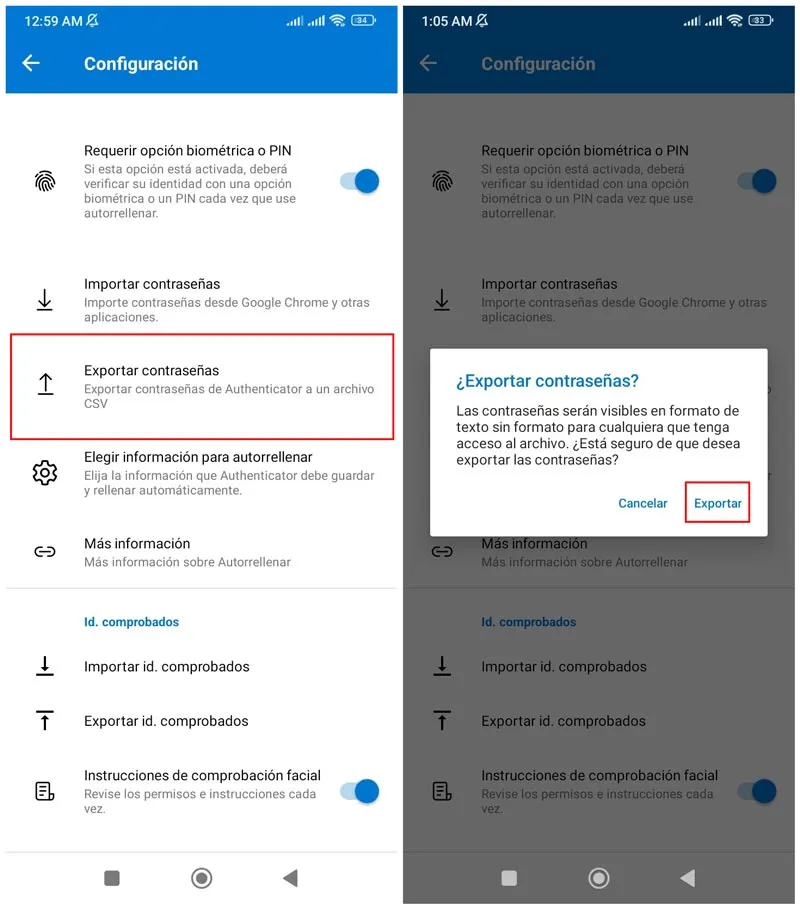
You can save this file on your mobile or send it by mail, and then you can import it in some of the best authenticator alternatives. In this way you will have saved your passwords to put them in shelter.
Key dates in Microsoft Authenticator
Remember that these are the key dates that you should take into account about the use and changes of Microsoft Authenticator:
-June 2025: You can no longer save new passwords.
-July 2025: The self -fulfilled function will be deactivated.
-August 2025: You will not be able to access the passwords stored from the app.
Not only passwords will disappear from Microsoft Authenticator. The application will also delete the payment data that the user has saved, such as debit cards or bank accounts. The only thing that will remain active will be the so -called passkeys or access keys, although without the functionality of self -fulfilled.
So if you had depended on this application as your main key manager you will have to look for alternatives in the coming months.
Leave a Reply