

The vast majority of mobiles today do not offer technical and useful information about the phone processor. Because of this, it is complex to know with precision what is the real power of the chipset and what model it is, in order to have an idea of what could offer when executing applications and demanding video games.
Therefore, if you do not find anywhere the information of the processor of your smartphone and you want to have it at hand to make all kinds of comparisons and analysis, in this article you will learn to extract the CPU data in a simple, fast and safe way.
So you can know what processor your phone possesses
Some mobiles expose the information of the CPU and others not, so the best method that exists to Know what chipset your smartphone has is to use a third -party application called CPU-Zwhich is available on Google Play Store and App Store.
It is a free app that will provide you with detailed and real -time information about the processor model and its live performance. You will also obtain data on the motherboard, RAM, GPU, sensors and offer a basic performance test that will help you analyze the power of the chipset in multinuk tasks.
In this way, if you want to get all the information of your mobile CPU, do the following:
-Search and install the CPU-Z application, enter it and select the option "SOC" (upper menu) to know the details of the processor. There you will see the chipset model that your phone has and other points of interest, such as the nuclei it owns, CPU active in real time and its power, load of the GPU, among others.
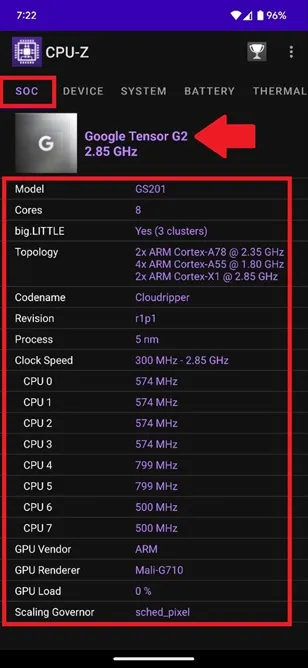
That is all you should do and the procedure is the same in Android and iOS. In CPU-Z you will also find information about the mobile specifications, the operating system, the battery status, the temperature of the terminal and the sensors it possesses.
Leave a Reply