

Winamp is a music player that reached the peak of its popularity in the late 90s and early 2000s. Although it is a software that was developed decades ago, it is still valid today on various platforms, such as Windows, macOS, Android and iOS, so it has not been left behind over time.
It is a player compatible with various audio formats such as MP3, FLAC, WAV, AAC, OGG, among others. In addition, it is a program that weighs little and requires a minimum of resources to work perfectly, making it perfect for mobile phones and older computers.
Its interface is easy to use, fast, and has the most important options just a click away, such as access to the library, playlist generation, application skin designs, and more. Thus, Winamp's fame and much of its longevity can be summarized in three pillars: speed, customization and simplicity.
How to use Winamp
Using Winamp should not pose any complications because the platform is extremely intuitive, you just have to do the following:
– First download the Winamp app, either in the Google Play Store or the App Store, this will depend on the operating system of your mobile. If it is a computer, you will get the Winamp software on its official website, you should not resort to third parties (https://winamp.com/).
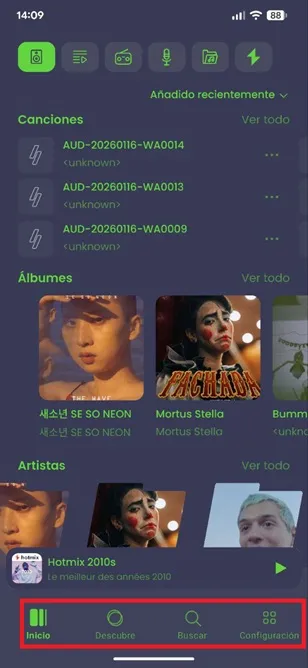
– Once inside the app, you have all the management options for your library in the top menu. There you can access all the songs, albums and artists that Winamp has registered, as well as recently created and added playlists, the radio stations you follow, your favorite podcasts, audio files (notifications, ringtones, WhatsApp audios, downloads and music)...
You also have at your disposal “Hotmixes”, which are playlists generated by Winamp that cover all types of genres, such as rock, 2000s pop, country, etc.

– On the other hand, in the lower menu you have functions such as discovering music saved on your device and a search engine to find songs based on the band, artist and track name.
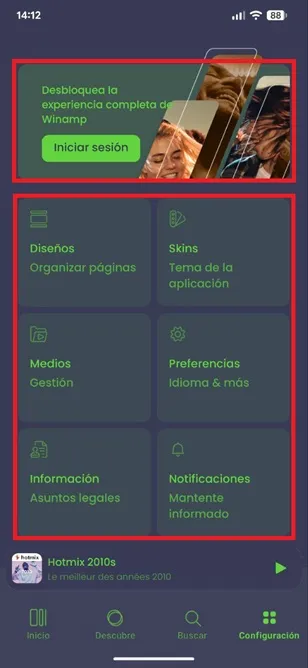
– Finally, in the “Settings” section you can create a Winamp account to unlock more features and you can also customize other sections.
Among other things, you can change the design and organization of the interface, apply another skin to the application, manage audio files, modify the language...
Leave a Reply